
Keep current prescriptions separate from reserve medicines. Regularly compare your list with the actual packages.
A worked example
During a teaching inventory, a card says Need to buy but a package is found at home. The writer checks its identity, condition and expiry, then updates purchase status without treating it as a taken-dose mark. Package quantity is written in notes if needed. The outcome is a list matching supplies on the review date. Neither a card nor a box means the medicine suits a new symptom or can be started without the necessary advice.
What to do
- 01
Collect medications from regular storage areas.
- 02
Note the name, form, expiration date and number of packages.
- 03
Remove expired items according to the rules of your region.
- 04
Check your first aid kit according to the calendar, and not just before illness.
Common mistakes
- Consider the presence of the drug as permission to start it without consultation.
- Store medications outside the instructions.
- Do not update the list after using the last package.
A shopping list is not automatic stock control
Vesometr can mark a purchase need and retain text descriptions. It does not automatically deduct tablets, calculate stock remaining or alert on expiry. Check real packages and retain the review date if using notes for inventory. Follow the particular product’s storage instructions. Separate expired or unwanted items from current supplies and check local handling arrangements. Do not copy one package’s label onto a similar item; an incorrect inventory can remain long after the original box is gone. Stock records support organisation, not a decision to use a medicine.
How to check the result
- Purchase status matches the checked package.
- Remaining stock is not assumed to be automatically verified.
- Expiry and storage are checked for the specific item.
A separate inventory step is checking medicine expiry dates.
How this works in Vesometr
Vesometr’s Need to buy status supports a shopping list. Quantity and expiry can be described in notes; there is no automatic stock control or intake confirmation.
Sources and fact checking
App features were checked against Vesometr 1.2.2. External sources explain general guidance, rather than validating individual medical conclusions.
- FDA — Don’t Be Tempted to Use Expired Medicines — Checking expiry dates and following instructions for unwanted medicines.
- Vesometr 1.2.2 — Features checked against the Vesometr 1.2.2 release source.
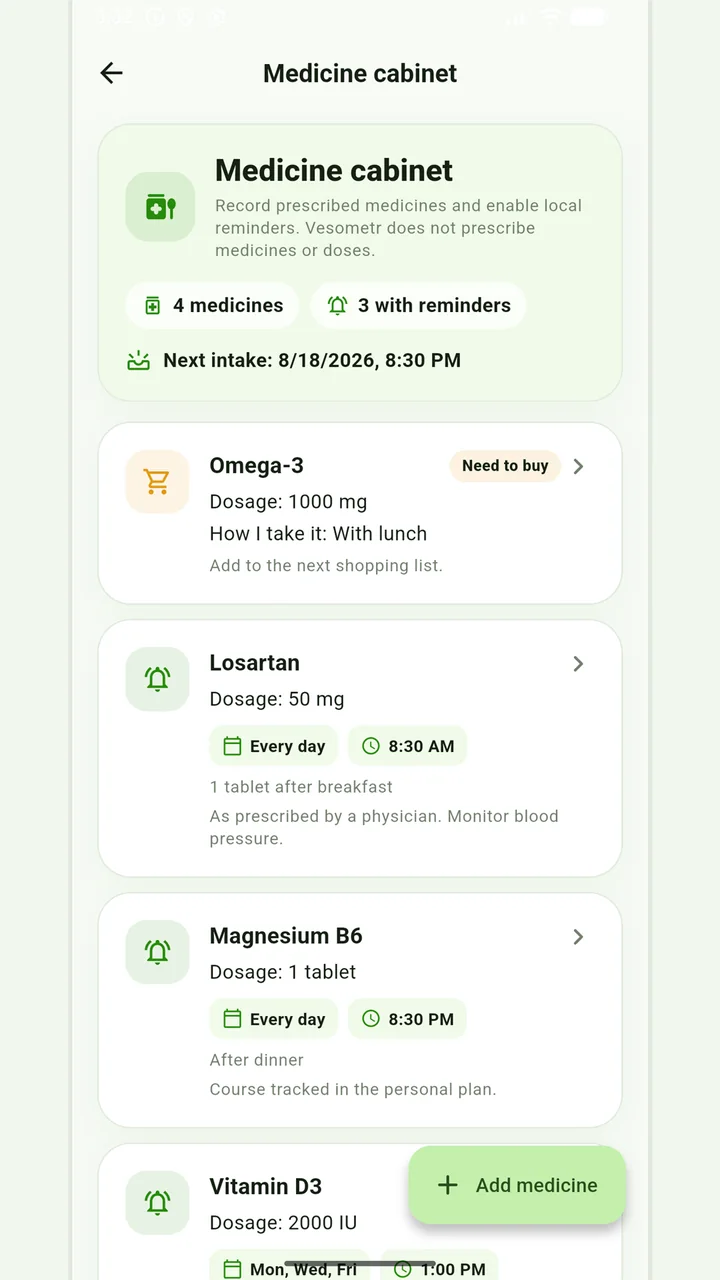
Medicine cabinet and schedule
Medication, doses, weekdays, multiple times and local reminders.
Do not change the dose, time, duration of the course and combination of drugs according to the article or the application prompt. If you miss a dose, have an unwanted reaction, or are in doubt, follow the instructions for the drug and check with your doctor or pharmacist.
Medical disclaimer