
Tie the onset to a symptom, prescription, or regimen change, and add a short baseline interval to the event, if there is one.
A worked example
Worked example: a user changed their usual routine halfway through a month and wants to discuss their observations. Instead of producing a full-year document, they select a period containing entries before and after the event. They leave several unrecorded days blank and explain that no readings were taken. Before saving, they check both date boundaries in the calendar and finished PDF. If the clinician requested particular dates, they follow that request rather than extending the report for more pages or a more convincing-looking chart.
What to do
- 01
Formulate a question for the report.
- 02
Find the date of the important change.
- 03
Add a comparable period before and after.
- 04
Remove irrelevant sections if the format allows.
Common mistakes
- Always export all year.
- Select periods with unusual values only.
- Change dates artificially for the sake of completeness.
Choose a period that answers the question
A long interval can bury the relevant episode among many entries, while an overly short one can remove useful context. Start with the consultation question or agreed observation period, then check whether actual records exist near its boundaries. Vesometr PDF table rows come from blood-pressure entries; a weight entry in the calendar does not itself create a report row for that day. Do not move entry dates to fill the table. Explain changes in routine separately when comparing conditions, without treating a timing coincidence as proof of a cause.
How to check the result
- The period relates to a specific question.
- The start and end dates are checked.
- Missing days are not filled with invented readings.
- PDF boundaries are reviewed after generation.
Before sharing, complete a journal quality check.
How this works in Vesometr
In Vesometr, different chart scales help you see in advance which segment contains the desired dynamics.
Sources and fact checking
App features were checked against Vesometr 1.2.2. External sources explain general guidance, rather than validating individual medical conclusions.
- Vesometr: official release — Application version and official download channel.
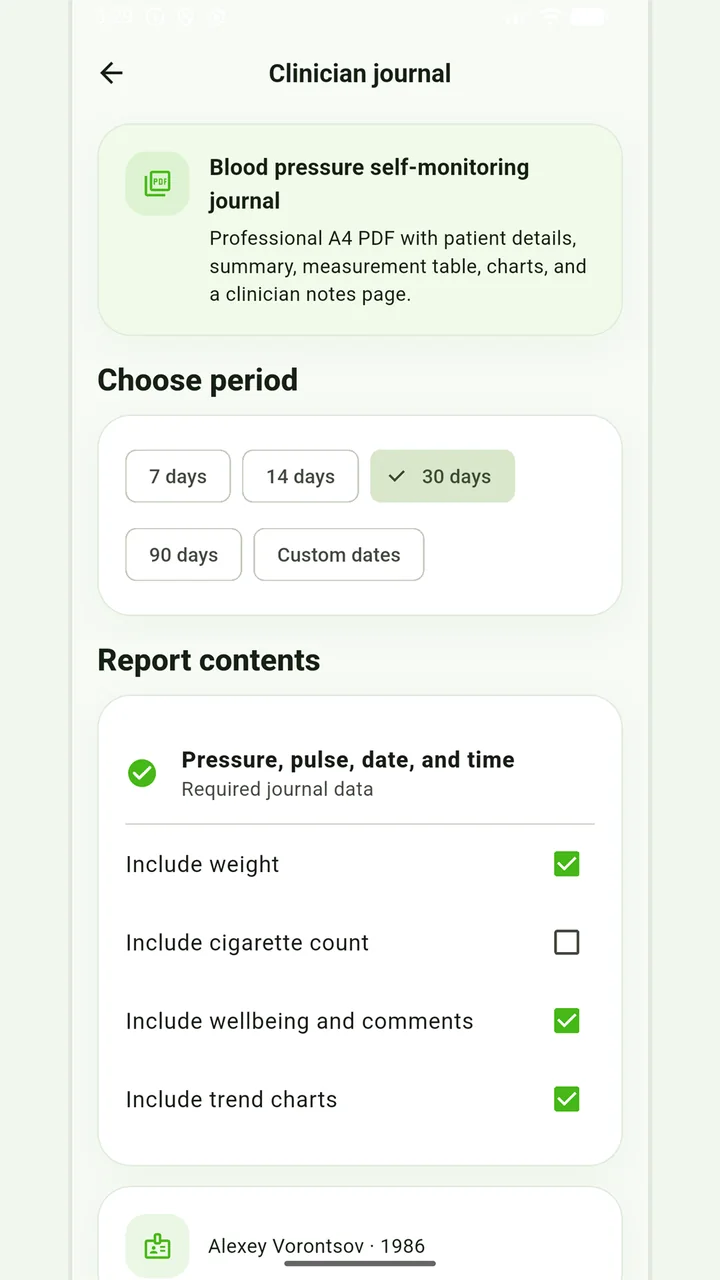
Blood-pressure PDF
A pressure and pulse journal, with optional weight and smoking information for the recorded days.
Don’t put off applying in order to accumulate the perfect report. If it is an emergency, report symptoms and follow directions from your healthcare provider; the diary can be shown later.
Medical disclaimer