
Start with meal type, description and the actual date and time. Add extra information in ordinary text only when it serves a clear question.
A worked example
Worked example, using fictional meals. After lunch, someone selects “Lunch”, sets 13:20 and writes “soup, bread, tea”. In the evening they remember an apple but not its precise time. They add a snack described as “between 16:00 and 17:00; time approximate”. The result is two understandable entries with different certainty. The app does not turn descriptions into calories or determine portion size. This may answer a question about meal order, while a diary agreed with a clinician may require a different, more detailed format.
What to do
- 01
Choose a simple one-line format.
- 02
Write down immediately after eating.
- 03
Use regular household measures if exact weight is not needed.
- 04
Review your regimen once a week without judging an individual dish.
Common mistakes
- Start with dozens of fields.
- Divide food into good and bad instead of describing it.
- Recover omissions with fictitious accuracy.
Make one entry describe one clear event
Do not begin by trying to reconstruct every ingredient. Decide what you need to recognise later: timing, contents or circumstances. Save meals separately when their sequence matters to your question. Portion size, drinks and personal sensations can be added to the description, but Vesometr does not recognise them as separate measurements. During later entry, check date and time: the automatically supplied moment may not be when you ate. If a detail is unknown, identify the uncertainty rather than completing the history with plausible guesses. A short accurate record is easier to interpret than invented precision.
How to check the result
- A suitable meal type is selected.
- The description remains understandable several days later.
- Event time is checked when entering later.
- Unknown details are not replaced with invented precision.
After choosing a minimal format, define how to record meal times so the sequence stays interpretable.
How this works in Vesometr
Food entries provide breakfast, lunch, dinner or snack, a free-text description, date and time. There are no separate calorie, portion, water or hunger fields.
Sources and fact checking
App features were checked against Vesometr 1.2.2. External sources explain general guidance, rather than validating individual medical conclusions.
- Vesometr 1.2.2: official APK — Identifies the release; food-entry fields were also checked against its source code.
- CUH NHS: Food, Mood and Symptom Diary — Illustrates separate fields for time, food and contextual comments.
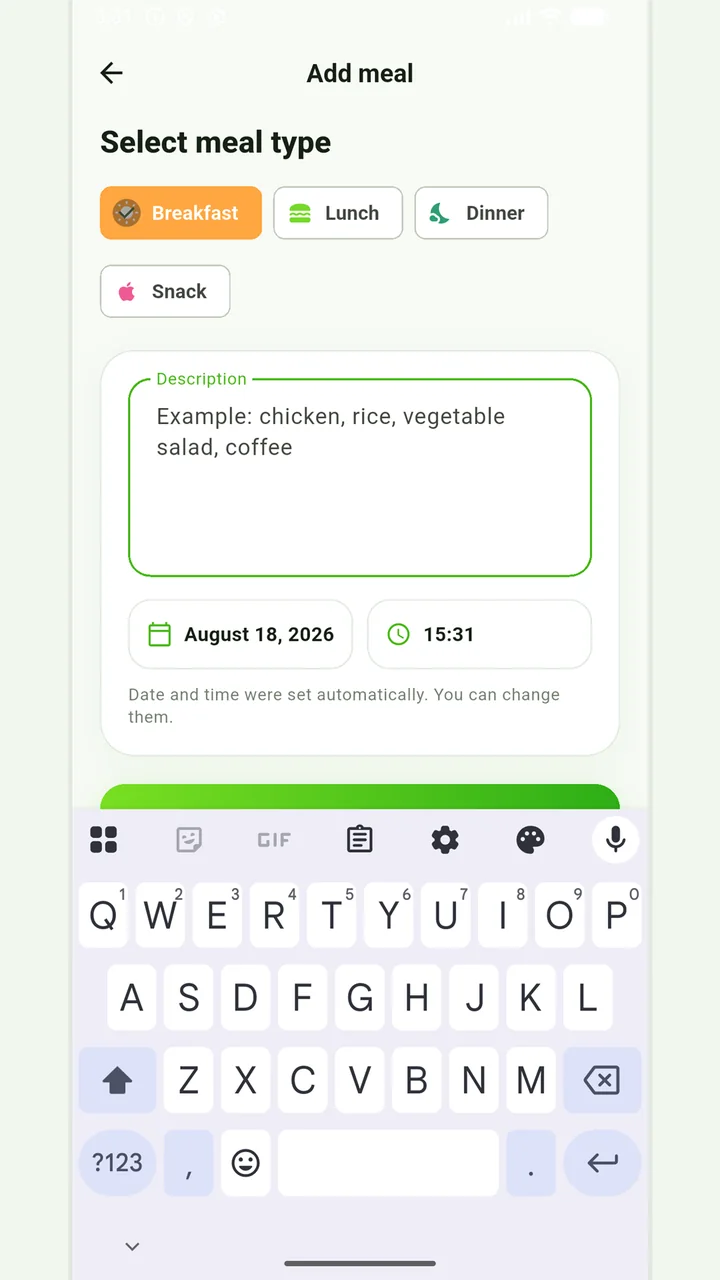
Simple meal journal
Breakfast, lunch, dinner or snack with a description, date and time.
In case of eating disorders, severe dietary restrictions, allergic reactions or a therapeutic diet, it is better to coordinate the observation plan with a specialist.
Medical disclaimer