
State the form, dose, regimen and reason for use in your own words, without hiding rare or seemingly unimportant items.
A worked example
Before a teaching appointment, the user checks everything actually used, including occasional and non-prescription products. An uncertain name remains a question with the package available for checking rather than being replaced by a similar one. The current regimen is separate from completed use, with reliable details identified. The blood pressure PDF is prepared separately because medicine-cabinet cards are not included. The clinician receives a readable list and relevant journal without an assumption that one file contains the entire history.
What to do
- 01
Update your list immediately before your visit.
- 02
Separate current medications from completed courses.
- 03
Add allergies and adverse reactions as separate questions.
- 04
Take packaging or photographs of labeling when in doubt.
Common mistakes
- Write down only names without doses.
- Forget drops, ointments, inhalers and supplements.
- Assume your clinician can automatically see prescriptions from another clinic.
Recheck the list for the appointment date
Verify full name, formulation, labelled strength and prescribed regimen for each item. State actual departures and questions without independently correcting clinical decisions. Do not omit supplements, topical products or occasional use because they seem insignificant. Vesometr retains cards but does not reconcile them automatically with instructions from another institution. Version 1.2.2’s PDF does not export the medicine cabinet. Prepare a readable separate list from checked cards and inspect it before sharing. A JSON restoration backup is not a substitute for that targeted list.
How to check the result
- The list has a current review date.
- All products actually used are visible and uncertainties flagged.
- Medicine-cabinet contents are not assumed to be in the PDF.
Unclear combinations can be prepared as questions about a complex medicine regimen.
How this works in Vesometr
Vesometr medicine-cabinet cards are not included in its blood pressure PDF. Prepare a separate checked medicine list; the PDF can supplement it with pressure readings and other available metrics.
Sources and fact checking
App features were checked against Vesometr 1.2.2. External sources explain general guidance, rather than validating individual medical conclusions.
- FDA — Use Medicines Wisely — Medicine lists, following directions and questions for a clinician or pharmacist.
- Vesometr 1.2.2 — Features checked against the Vesometr 1.2.2 release source.
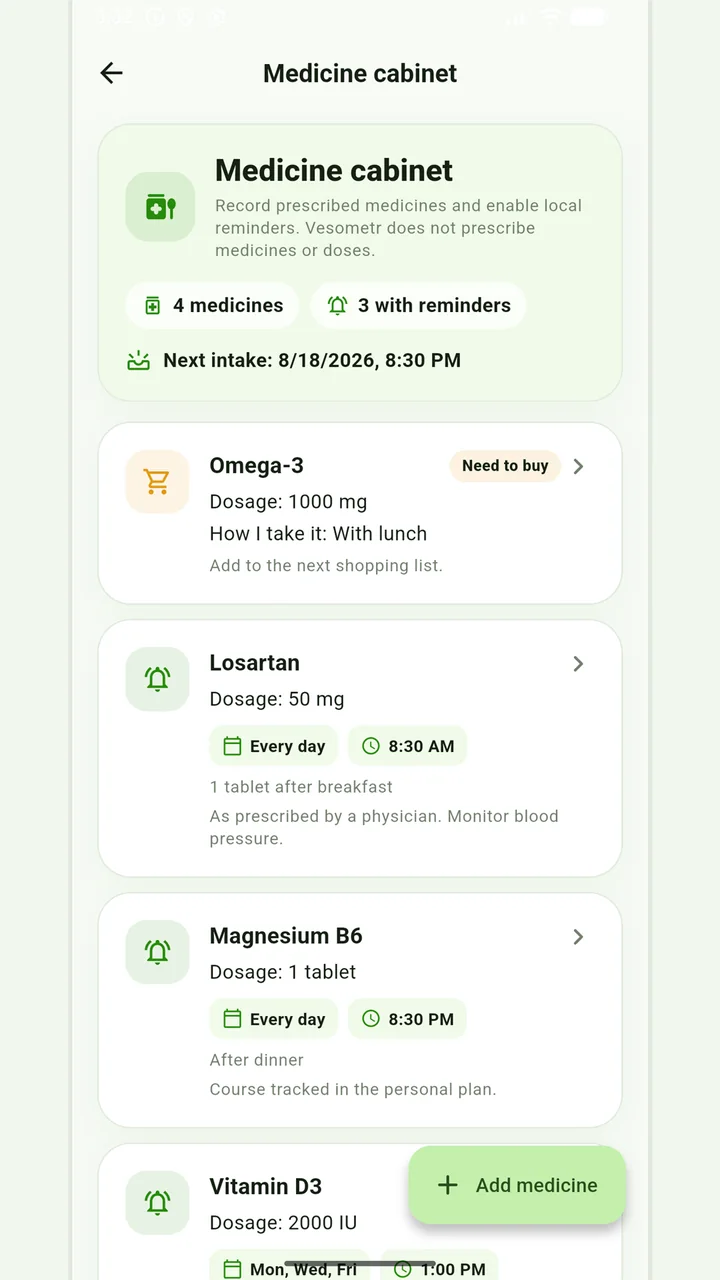
Medicine cabinet and schedule
Medication, doses, weekdays, multiple times and local reminders.
Do not change the dose, time, duration of the course and combination of drugs according to the article or the application prompt. If you miss a dose, have an unwanted reaction, or are in doubt, follow the instructions for the drug and check with your doctor or pharmacist.
Medical disclaimer