
Before setting up, review each line of the prescription: dose, frequency, specific time or connection with food intake, duration and special instructions.
A worked example
A teaching prescription gives a clear dose but ambiguous timing. The user copies the exact wording into How I take it and asks a clinician or pharmacist about the timing before configuring a signal. Once clarified, they compare the card line by line with the instructions. The result is a checked transcription. No universal hours or intervals are offered: several notifications cannot decide how to space a medicine or relate it to meals.
What to do
- 01
Check the name, formulation and exact instructions.
- 02
Clarify uncertain timing or food-related directions with a clinician or pharmacist.
- 03
Retain regimen and duration as text; configure only agreed times and weekdays.
- 04
Review the card and existing reminders after any change.
Common mistakes
- Guess the spacing of doses when the prescription is unclear.
- Replace an instruction to take a medicine before or after food with a convenient time.
- Combine different drugs into one record.
Check instruction text and technical timing separately
A reminder represents signal times and weekdays. It cannot interpret medical abbreviations, food instructions or prescription changes. Vesometr stores regimen text separately from selected times, so consistency needs a manual check. Course duration can be written in notes; the 1.2.2 model does not automatically disable reminders on an end date. After instructions change, clarify the new rule and review old times for duplicates. The application neither checks compatibility nor converts unclear wording into a safe regimen. A correctly configured signal still does not prove a dose was taken.
How to check the result
- Ambiguous timing is clarified before the signal is enabled.
- Times and weekdays match current instructions.
- Written duration is not mistaken for automatic shutdown.
After transferring the instructions, check medicine reminders on the device.
How this works in Vesometr
Vesometr stores regimen text and multiple local reminder times. It does not determine course dates, automatic course completion or prescribed dose intervals.
Sources and fact checking
App features were checked against Vesometr 1.2.2. External sources explain general guidance, rather than validating individual medical conclusions.
- FDA — Use Medicines Wisely — Medicine lists, following directions and questions for a clinician or pharmacist.
- Vesometr 1.2.2 — Features checked against the Vesometr 1.2.2 release source.
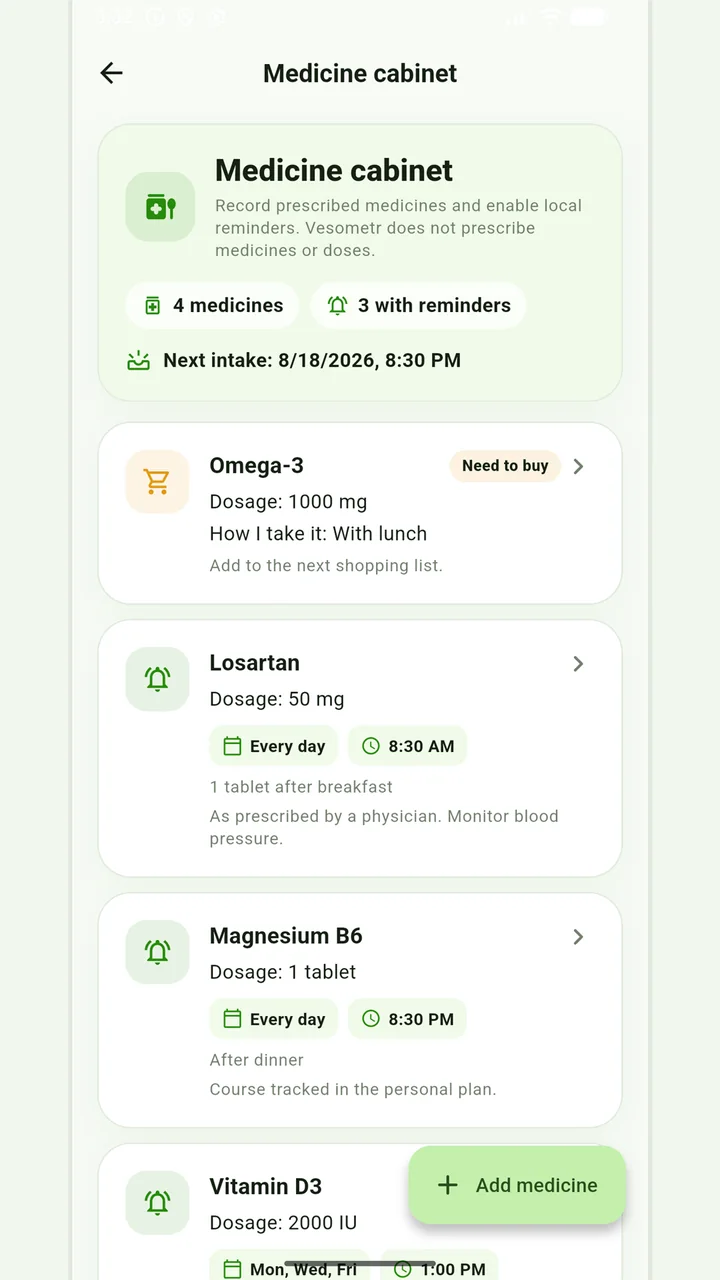
Medicine cabinet and schedule
Medication, doses, weekdays, multiple times and local reminders.
Do not change the dose, time, duration of the course and combination of drugs according to the article or the application prompt. If you miss a dose, have an unwanted reaction, or are in doubt, follow the instructions for the drug and check with your doctor or pharmacist.
Medical disclaimer