
Give the drug a recognizable name, set only scheduled times, and test how notifications look on your lock screen.
A worked example
After the instructions are clarified, a teaching card has several agreed times. The user adds them to one item, checks weekdays and the displayed time list, then discovers an older duplicate card for the same medicine. They establish why it exists before keeping both signals. The result is one understandable technical schedule matching verified instructions. Signal count does not confirm actual doses taken and does not authorise changing intervals independently.
What to do
- 01
Create one item with the full name and instruction text.
- 02
Add only agreed reminder times and weekdays.
- 03
Compare the saved time list with the prescription and check duplicates.
- 04
Test the next signal as a technical event, not an additional dose.
Common mistakes
- Create a separate card for each time and receive duplicates.
- Use the same abbreviations for different medications.
- Change intervals for convenience without consultation.
Several times do not require several cards
One Vesometr card supports multiple times and selected weekdays. Prescription text remains a separate field and should agree with the technical settings. The next reminder is calculated from times and weekdays, but there is no separate taken-dose calendar or intake confirmation. Check the displayed times after saving and after prescription changes. A test notification checks the signal, not an extra medicine dose. Do not adapt a medical regimen to convenient buttons; clarify uncertain timing with a professional first. The application organises a plan rather than documenting every act of taking a medicine.
How to check the result
- One item contains the verified time list.
- Duplicate cards have been investigated.
- A signal is not recorded as proof of taking a dose.
For a technical check, see setting up local medicine reminders.
How this works in Vesometr
A Vesometr card supports several times and weekdays. There is no separate actual-dose calendar or taken-dose confirmation.
Sources and fact checking
App features were checked against Vesometr 1.2.2. External sources explain general guidance, rather than validating individual medical conclusions.
- FDA — Use Medicines Wisely — Medicine lists, following directions and questions for a clinician or pharmacist.
- Vesometr 1.2.2 — Features checked against the Vesometr 1.2.2 release source.
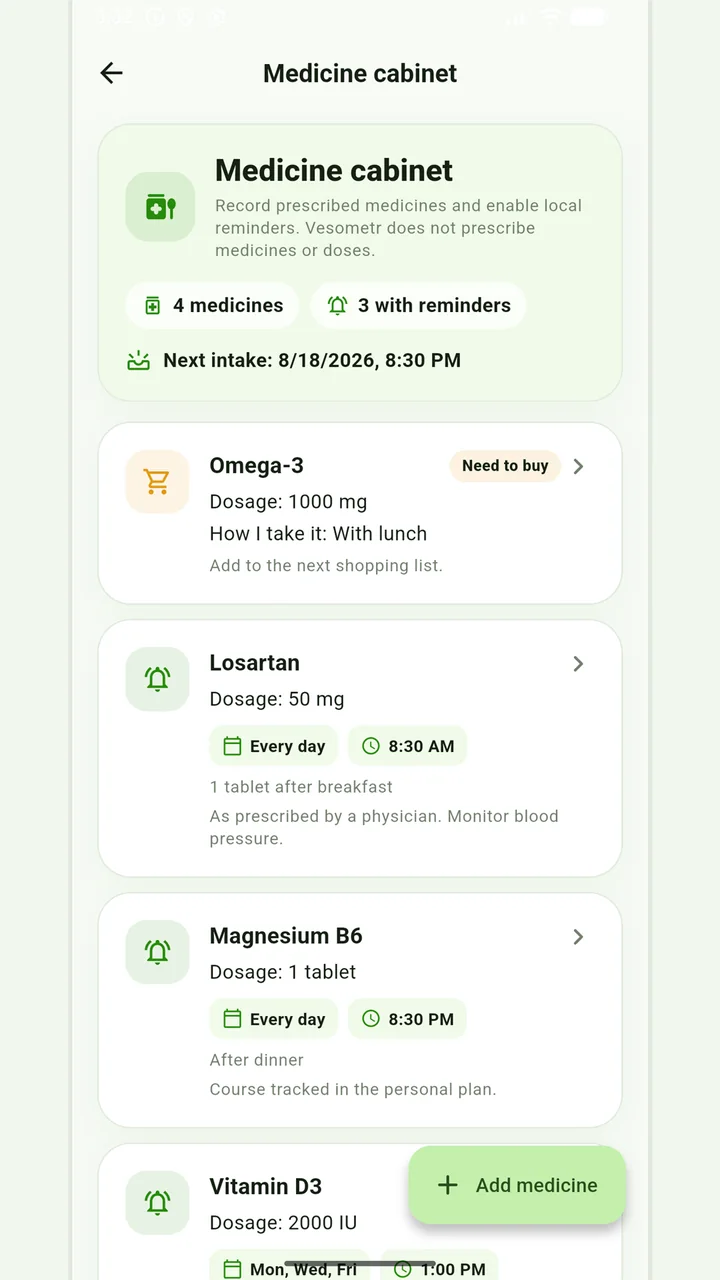
Medicine cabinet and schedule
Medication, doses, weekdays, multiple times and local reminders.
Do not change the dose, time, duration of the course and combination of drugs according to the article or the application prompt. If you miss a dose, have an unwanted reaction, or are in doubt, follow the instructions for the drug and check with your doctor or pharmacist.
Medical disclaimer