
Specify the goal consciously and coordinate it with a specialist if you have illnesses, pregnancy, recovery or significant weight changes.
A worked example
Worked example: a user enters a weight target and sees it alongside current records. They do not treat it as a medical norm calculated by the app or change it after every fluctuation. When the old objective no longer fits, they deliberately update the target setting after checking the unit and value. They do not rewrite weight history to make progress look complete. If unsure whether a target is appropriate, they discuss it with a clinician rather than treating the chart's presentation as treatment or dietary advice.
What to do
- 01
Open the weight-target setting.
- 02
Check the reference value and unit.
- 03
Save the deliberately chosen target without changing source measurements.
- 04
Open the overview and check the display.
Common mistakes
- Putting someone else's ideal number.
- Change the target after each jump.
- Consider achieving this figure as a sufficient assessment of health.
The user sets the target; history remains factual
Vesometr stores the target in settings and uses it as a display reference. Changing it does not correct measurements or establish that the chosen direction suits a particular person. Separate correcting a mistyped value from reconsidering the objective itself. For the former, verify the original number; for the latter, review the reason for the choice, especially when health circumstances affect suitable changes. Do not enter a target for an attractive completion percentage. Real dates and values support discussion better than adjusted history. After saving, open the overview and confirm that it shows the intended reference.
How to check the result
- The target is chosen deliberately rather than treated as a diagnosis.
- The unit and value are checked.
- Source measurements are not changed to improve progress.
- The overview shows the intended reference after saving.
Review the history using suitable chart periods.
How this works in Vesometr
The weight target is stored in settings and displayed as a user-defined reference. The app does not prescribe it as a medical norm.
Sources and fact checking
App features were checked against Vesometr 1.2.2. External sources explain general guidance, rather than validating individual medical conclusions.
- Vesometr: official release — Application version and official download channel.
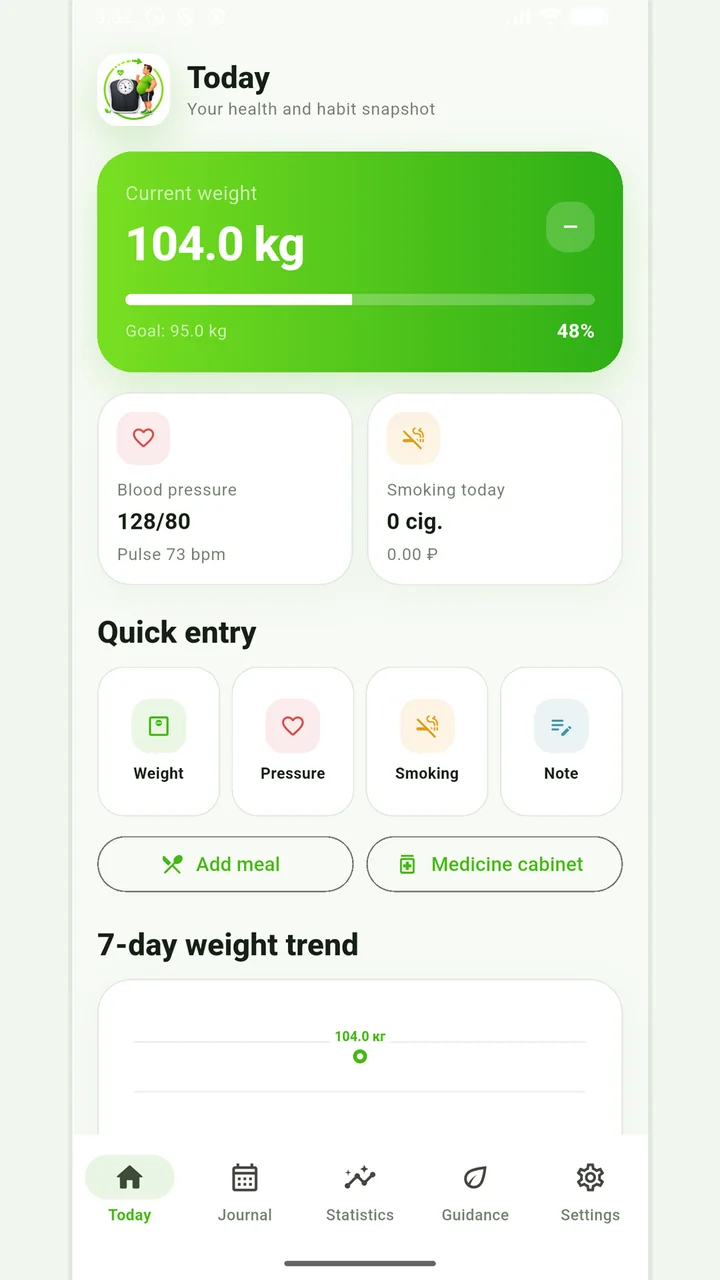
Vesometr 1.2.2
The main application tools and the current Android build.
The app organizes entries and reminders, but cannot verify a treatment plan or replace professional advice.
Medical disclaimer