
Before submitting the report, make sure that the specialist understands the symbols and your abbreviations, regardless of the menu language.
A worked example
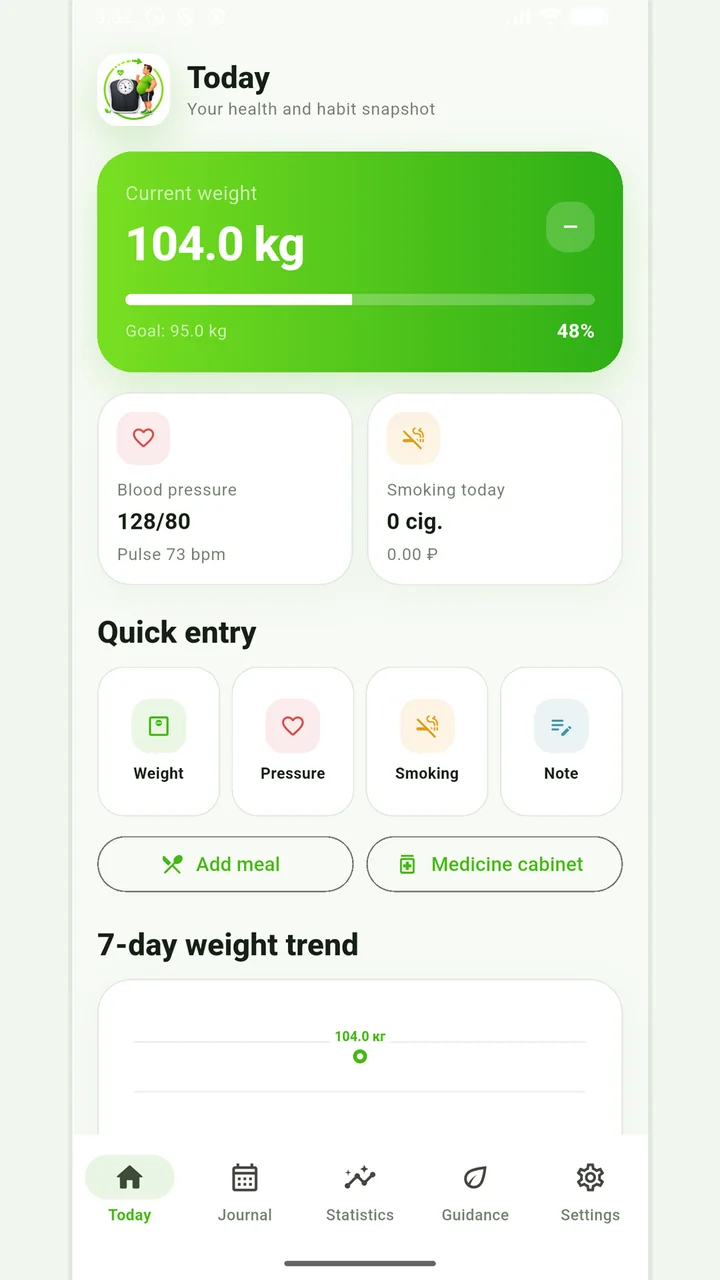
Worked example: a user switches Vesometr to English before a consultation, but their note remains in Russian. This is expected: interface labels change, rather than text entered by the user. They explain important abbreviations separately, generate a new PDF in the intended language and check its pages. The older saved document remains unchanged. Source numbers and dates are not rewritten for translation. When translating an explanation themselves, they flag unclear words for clarification rather than adding medical meaning that was absent from the original observation.
What to do
- 01
Select the language in the application or system settings according to the available option.
- 02
Check the units and labels of the main fields.
- 03
Don't count on automatic translation of your notes.
- 04
Unscramble abbreviations before exporting.
Common mistakes
- Consider changing the interface as a translation of existing records.
- Mix units without explanation.
- Use machine translation for medical decisions without verification.
Interface language and personal text are independent
Bilingual labels provide access to the same functions but do not translate a diagnosis, prescription or free-form comment. Recipients need understandable units, dates and explained abbreviations. After switching language, check report settings and the generated PDF; existing files do not update. Blood-pressure comments may remain in the user's original language, while the free-form diary is not exported. If medical documents need professional translation, arrange it separately with the organization. Changing the menu language neither establishes translation accuracy nor changes the meaning of a recorded observation.
How to check the result
- Interface labels use the selected language.
- Personal notes are not assumed to be automatically translated.
- A new PDF is checked after changing language.
- Abbreviations are explained to the recipient.
Before the consultation, also complete a journal quality check.
How this works in Vesometr
Vesometr supports Russian and English interface and saves user-entered text locally.
Sources and fact checking
App features were checked against Vesometr 1.2.2. External sources explain general guidance, rather than validating individual medical conclusions.
- Vesometr: official release — Application version and official download channel.
Vesometr 1.2.2
The main application tools and the current Android build.
The app organizes entries and reminders, but cannot verify a treatment plan or replace professional advice.
Medical disclaimer